Broker, topics, messages, logic and dashboard — no need to switch between tools.
MQTT Control RS: a tool for MQTT, logic and operator panels
Connect brokers, inspect messages, build visual flows, combine charts with advanced metrics and create operator panels without extra tools.
Node-based flows: filters, timers, schedules, routing and reactions to events.
A desktop app for Windows, Debian, Fedora, Arch and Armbian. The MQTT broker is yours — the application connects to it.
How it looks in practice
Two real application views: visual logic editing and an HMI dashboard with widgets connected to live broker data.
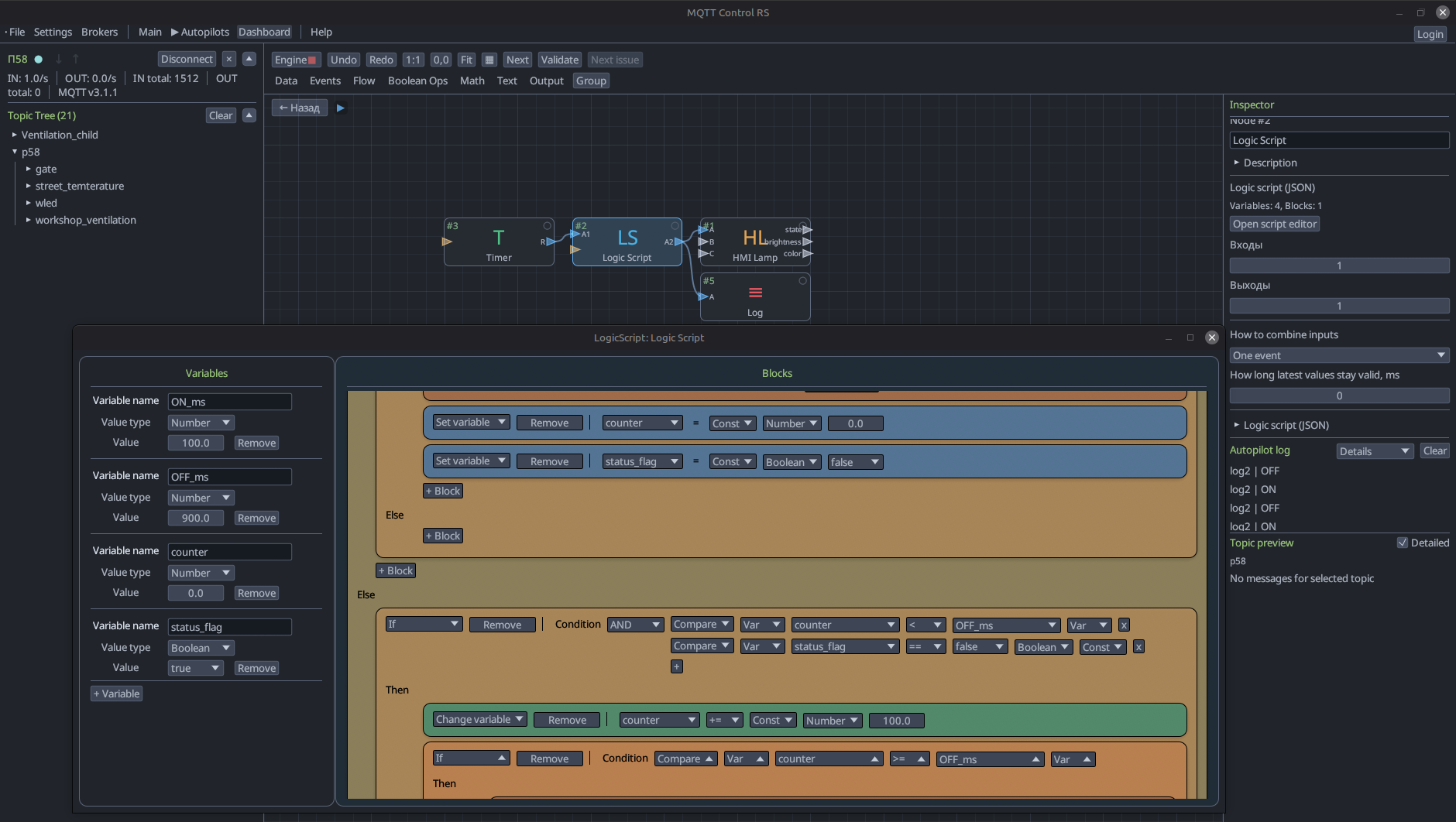
LogicScript editor inside the autopilot
Complex local behavior stays inside one node: variables, conditions, nested blocks and outputs are edited in a dedicated visual script editor.
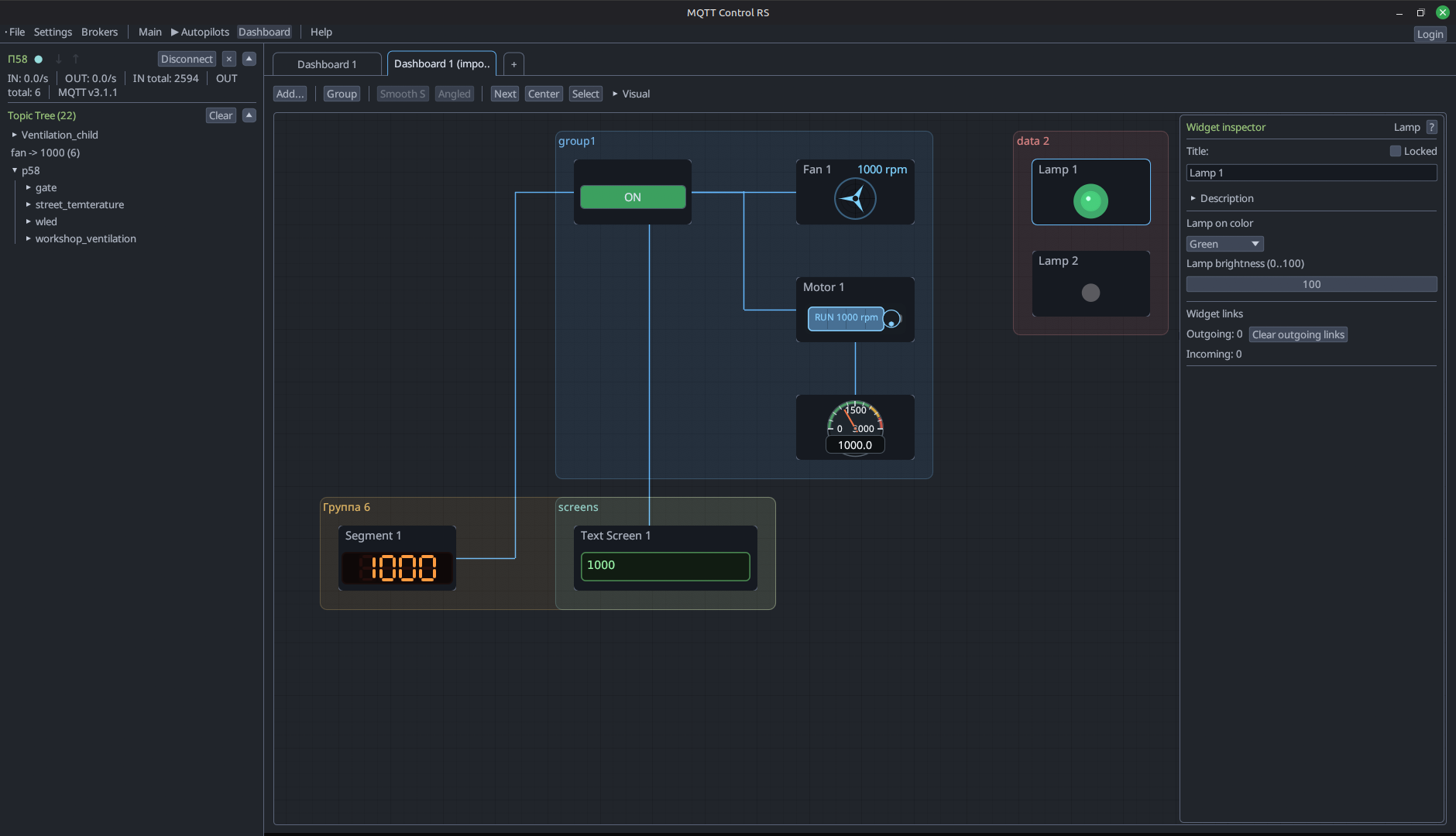
Dashboard / HMI workspace
Operator screens combine lamps, indicators, gauges, text panels, motor and fan widgets in one linked dashboard.
Key capabilities
Topic tree and diagnostics
Connect to a broker and immediately see the structure: all topics, live message flow and packet contents. Convenient for debugging and behavior checks.
Visual logic editor
Build processing flows from nodes — inputs, filters, conditions, transforms, timers and outgoing actions. The logic is readable at a glance instead of buried in code.
Schedules and routing
Configure recurring checks, conditional branches and service chains right in the same editor as the main logic.
Charts and analytics
Overlay multiple signals on one chart, track metrics and find the cause of abnormal behavior faster — without external monitoring systems.
Operator panels (Dashboard / HMI)
Assemble operator screens for a specific task: buttons, switches, indicators, gauges and charts. Everything binds to real broker data.
Who it is for
Automation engineers
Equipment, production lines and test stands. Fast traffic diagnostics, convenient logic building and ready-to-use HMI panels.
Smart home and workshop
Lighting, climate, irrigation, garage. No programming required, with a visual result.
Hobby and interactive projects
Lights, sound, effects, installations. For cases where MQTT events must be linked to a visible reaction.
How it works
MQTT Control RS is designed for everyday work without extra manual hassle.
- Connect to brokers and move straight to message inspection.
- Assemble flows with predictable logic and explicit nodes.
- Compare signals on charts and track metrics in one window.
- Launch operator panels and work screens for a specific task.
What is in development
The next development stage focuses on debugging, load and more complex scenarios.
- Load testing and behavior checks on a stand.
- Visual flow debugging, new nodes and a broader widget set.
- Multi-broker connectivity and easier work with several MQTT environments.
- Internal channels for exchange between graphs without an external broker.
FAQ
Which MQTT versions are supported?
MQTT 3.1.1 and 5.0. Version 5 adds support for extra packet fields such as reason codes, user properties and other protocol extensions.
Are autopilots and dashboards saved?
Everything is saved between sessions. Flows and operator panels can be exported and imported, which is convenient for moving between machines or making backups.
Is it suitable for production?
Yes. The tool works well both for debugging during development and for permanent operation on a live installation.
Does it work with cloud brokers?
Yes — AWS IoT, Azure IoT Hub, HiveMQ Cloud and any other standard broker. MQTT Control RS connects over the standard protocol, whether it is cloud or local network.
Will there be a mobile version or web access?
It is planned. But for now those are long-term plans.
Is the application paid?
It is free.
How is it different from Node-RED?
Node-RED is a server-side platform with thousands of community nodes. That sounds like an advantage, but in practice it means deploying a server, understanding the ecosystem and knowing which of hundreds of similar nodes to choose. MQTT Control RS is a desktop tool focused on MQTT. Its node set is intentionally compact: each node solves a specific task — only what an engineer actually needs.
Feedback
If you found a bug, want to suggest an improvement or discuss adoption, write to us.
- You can download the build on the downloads page.
- Email for bug reports: stewhiki@gmail.com.
- Project group: https://t.me/mqtt_control_rs.